I regret to announce that I have a theory. It involves handheld PCs, Project Helix – Microsoft’s next, PC game-running Xbox console – and least likely of all, an apparently sincere attempt at making Windows 11 less of a bulging, AI-infested colostomy bag. That attempt is better known as Xbox Full Screen Experience, and now that it’s finding its way onto portables outside the MS-branded Asus ROG Xbox Ally series (plus big-lad PCs as well), I’m convinced that it was introduced at least in part to test the waters of how a Windows PC/console hybrid could operate.
Upon its reveal last year, of course, Xbox FSE looked like it was merely addressing a very specific Windows 11 issue: that it was rubbish for handhelds. Its PC game compatibility outmatched what the Linux-based SteamOS could afford Steam Decks, but devices like the original ROG Ally and the Lenovo Legion Go still chafed under the lack of small-screen optimisation, an interface roundly unsuited to gamepad-style inputs, and absent sense of when the OS should back off its advertising schtick. No, I would not like to install Office 365 on my dinky games machine, thank you awfully.
FSE, as it did on the ROG Xbox Allies and is now doing on the Lenovo Legion Go 2, smooths out all three. Mostly. Like SteamOS – or just Steam’s Big Picture mode – it boots not into the usual Windows 11 desktop, but a chunky, griddy view that puts your games front and centre. It’s designed throughout for controller inputs and on-screen keyboards, and as long as you’re in it, a host of Windows’ background processes and default startup apps are suspended, freeing up RAM and processor headspace for games.
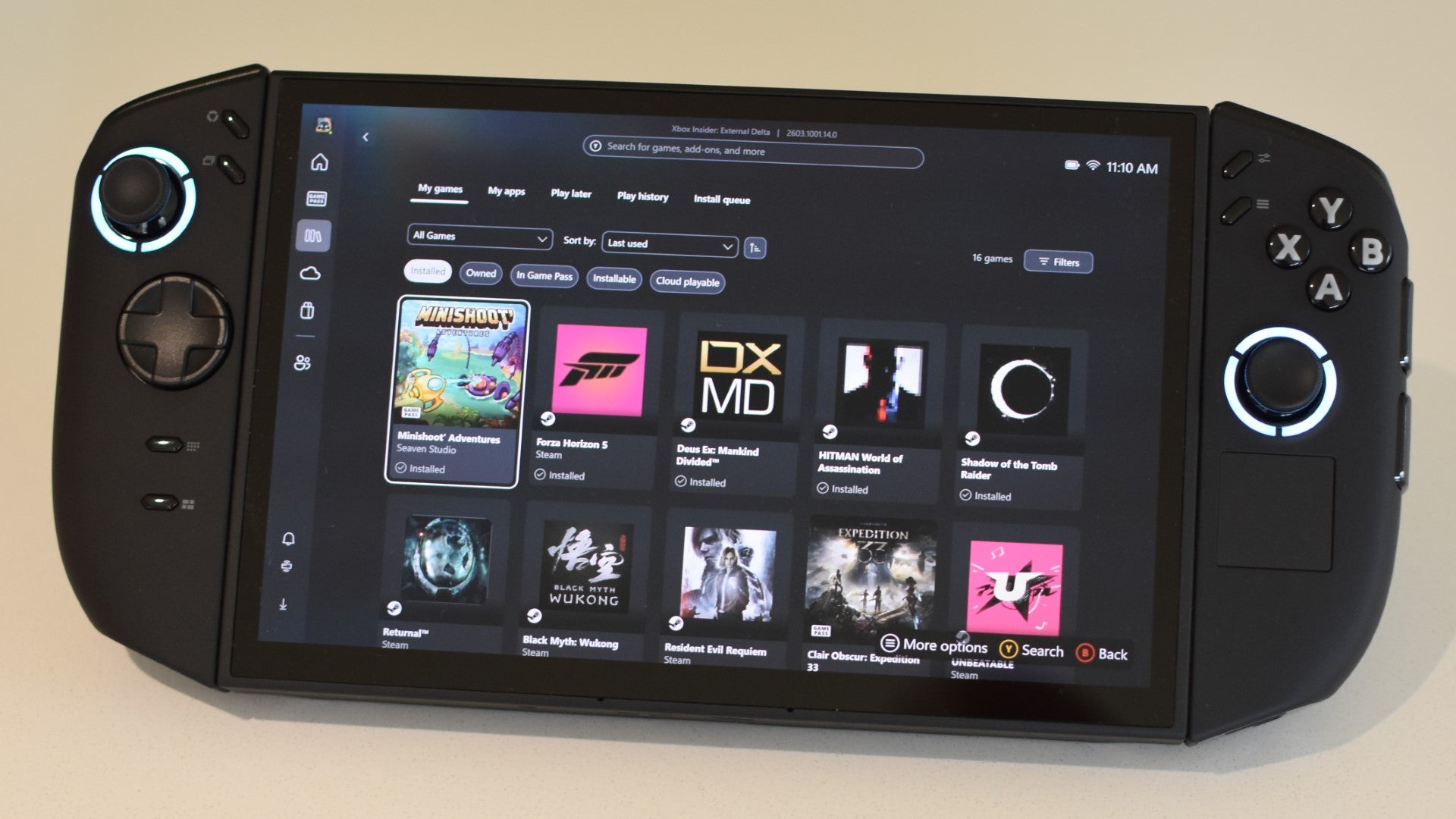
On a basic, ‘Is this preferable to stock Win11’ level, Xbox FSE is successful. It’s immediately better suited to gamepads and handhelds, and in addition to its disabling of non-gaming bloat, it exhibits little of the whining that Windows 11 unleashes when you try to venture beyond the Microsoft ecosystem. Y’know how it falls to its knees and begs you not change your default browser away from Edge? None of that in FSE: it even includes download widgets for Steam, GOG Galaxy, the Epic Games Store and the like, never interrupting their installation to plead the case of the Microsoft Store.
Now, there’s Project Helix. Newly installed Xbox chief Asha Sharma says it’s a console that plays PC games, the intimation being that it is is not a PC that plays console games. I’d contend that there’s no difference: existing consoles are already based on the same underlying GPU and CPU tech as desktops, laptops, and handheld PCs, and Xboxes specifically have long ran operating systems spun off from Windows. Nonetheless, Microsoft can’t just bung a copy of Windows 11 Home into Project Helix, or it would suffer the same affliction as those early handhelds: a desktop OS shoved where a desktop OS don’t fit.
It still needs something more flexible than a purely locked-down console OS, but that something should also streamline and gamepaddify the installation and launching of Windows games. It should more effectively scale itself to different screen sizes than Windows does. It should combine multiple and disparate game libraries into one. It should, in the minds of Sharma and co., have the word “Xbox” plastered all over it. It should, in other words, be something like Full Screen Experience.

Again, probably not the exact same thing, unless Microsoft fancy doing a mad one and literally making Project Helix a Windows 11 PC. But FSE is just too close a fit to ignore. And besides, what better place to sneakily dry-run a key feature of the next Xbox than the quiet niche of handhelds?
That, then, is my theory, and if I’m on the money to any greater extent than gently brushing a 1p piece, Xbox FSE bears closer examination. Sadly, this serves to remind us that even though it’s an improvement on bog-standard Windows, it still comes up short as a dedicated games platform.
In fairness, all that about adapting the interface and beefing up gamepad usability remains true. FSE is consistently thumbstickable and D-paddable, and makes clever use of face and shoulder buttons for shortcuts. The Y button, for one, jumps to each page’s search bar so it doesn’t need manual selection, while the right and left triggers can skip forward and back through a hefty game library, like on SteamOS. (Apologies if you’re a regular controller user and I’m praising tricks that have been around for years, like a stunned North Korean refugee eating Greggs for the first time. I just think they’re neat.)

It’s also welcoming of non-Microsoft launchers, permitting their installation with a single tap in the apps section. SteamOS is rightly praised for not locking users into the Steam store, but then the actual process of adding something like Battle.net to a Steam Deck is far more complex and technical. There’s little reason to think that will change by the time the Steam Machine, which is now positioned as something of a direct Project Helix rival, finally releases either.
Use FSE for a while, however, and it soon becomes apparent that it’s still just Windows with a tarp covering the uglier bits. For starters, it doesn’t have the same lightweight snappiness that SteamOS does – that swift, tightly engineered responsiveness when jumping between menu screens and firing up games.
I don’t doubt the factual basis of FSE disabling/suspending certain background processes, but it’s also a stretch to suggest that this “optimises” game performance in any meaningful way. Here’s how a few of our benchmark games ran on the ROG Xbox Ally X and Legion Go 2, first in Windows’ standard desktop mode and then in Xbox FSE. Outside of a little bump to Forza Horizon 5 on the Go 2, FSE’s framerate advantage is basically nonexistent, and some games actually dropped one or two frames after switching.

The SteamOS version of the Lenovo Legion Go S has already shown us that, all other hardware and power considerations being equal, a genuinely games-favouring OS can boost performance over that of stock Windows 11. FSE, therefore, is fulfilling neither its potential nor its promises on optimisation.
And, while it does supress most of Windows’ advertising impulses, FSE still looks like its designer had a CFO peering over their shoulder. The home page starts off well, its very first element being a row of shortcuts for recently played games. Below that, though, is nothing but store links and Game Pass promos. Reaching your own games library requires passing another Game Pass section on the sidebar – this, too, is essentially all ads, with no launch buttons for games you’ve already installed even if you got them through Game Pass. The tab for Xbox Cloud Gaming, which can actually be a decent workaround for handhelds’ lack of horsepower, also pushes access to your own streamed games down the page, its hierarchy favouring digital billboards for promoted releases.

Compare and contrast, once more, with SteamOS. This boots into a colourful, welcoming carousel of your recently-playeds, the rest of its home screen dedicated to news and updates for the games you already own – not the ones Valve want you to buy. Even when you visit the Steam store itself, SteamOS is also intelligent enough to prioritise games that would work well on your hardware, rather than blunderbussing you with random suggestions and subscription services. It’s just a nicer place to be, insofar as operating systems can be nice, or places.
Microsoft can, and possibly should, still apply the basic principles of FSE to Project Helix: as a player of PC games, it will need to accommodate the same variety of inputs that we use on our Windows-powered rectangles, and to welcome games outside the chosen Game Pass few. But whatever comes next, it needs to be better – faster, lighter, and less cynically laid out – than this.


