Making Potions in Minecraft is a startlingly complex endeavour depending on the kind of Potion you want to create. You can only start brewing Potions once you’ve collected various different resources from the Nether, but after that you can use this guide to find out how to make Potions of all kinds in Minecraft 1.16.5.
On this page:
How to make Potions in Minecraft
To make a Potion in Minecraft, you need these things:
- A Brewing Stand for brewing potions.
- Blaze Powder for fuelling your Brewing Stand.
- Glass Bottles to contain your Potions.
- A Water source nearby (Cauldron or Water block).
Every potion starts with a Water Bottle. To make a Water Bottle, just right-click on a water source with a Glass Bottle in your hand.
There are three steps to making a Potion:
- Make an Awkward Potion (Water Bottle + Netherwart) in the Brewing Stand.
- Add an effect ingredient to specify the Potion effect.
- (Optional) Add one or more modifier ingredients to change the nature of the Potion.
Steps 2 and 3 can be done in reverse order if you like, but step 1 always comes first (except when making a Potion of Weakness, which doesn’t need an Awkward Potion).
Best Minecraft Seeds | Best Minecraft Shaders | Best Minecraft Texture Packs | Best Minecraft Mods | Best Minecraft Servers | Minecraft Commands & Cheats | Minecraft house ideas | How to find a Minecraft Village | How to tame a fox in Minecraft | How to make Minecraft Fireworks
Potion modifier ingredients
Adding Glowstone Dust to some Potions will increase the strength of the effect (usually doubling it). These Potions will have a “II” at the end of their name.
Adding Redstone Dust to some Potions will extend the duration of the effect. These Potions will have a “+” at the end of their name.
Adding Fermented Spider Eye to some potions will corrupt the effect, turning it into a new kind of Potion.
Adding Gunpowder to any Potion will turn it into a Splash Potion. Instead of being drunk, a Splash Potion can be thrown on the ground, affecting everyone in an area around where it shatters.
Adding Dragon’s Breath to any Splash Potion will turn it into a Lingering Potion. The effects of a Lingering Potion persist in the area for a short while after breaking, and while the effect is reduced it can also stack if you stay in the area.
Minecraft Potion chart for 1.16.5
Here is a detailed Minecraft Potion brewing chart from the Official Minecraft Wiki which tells you how to create every kind of Potion:
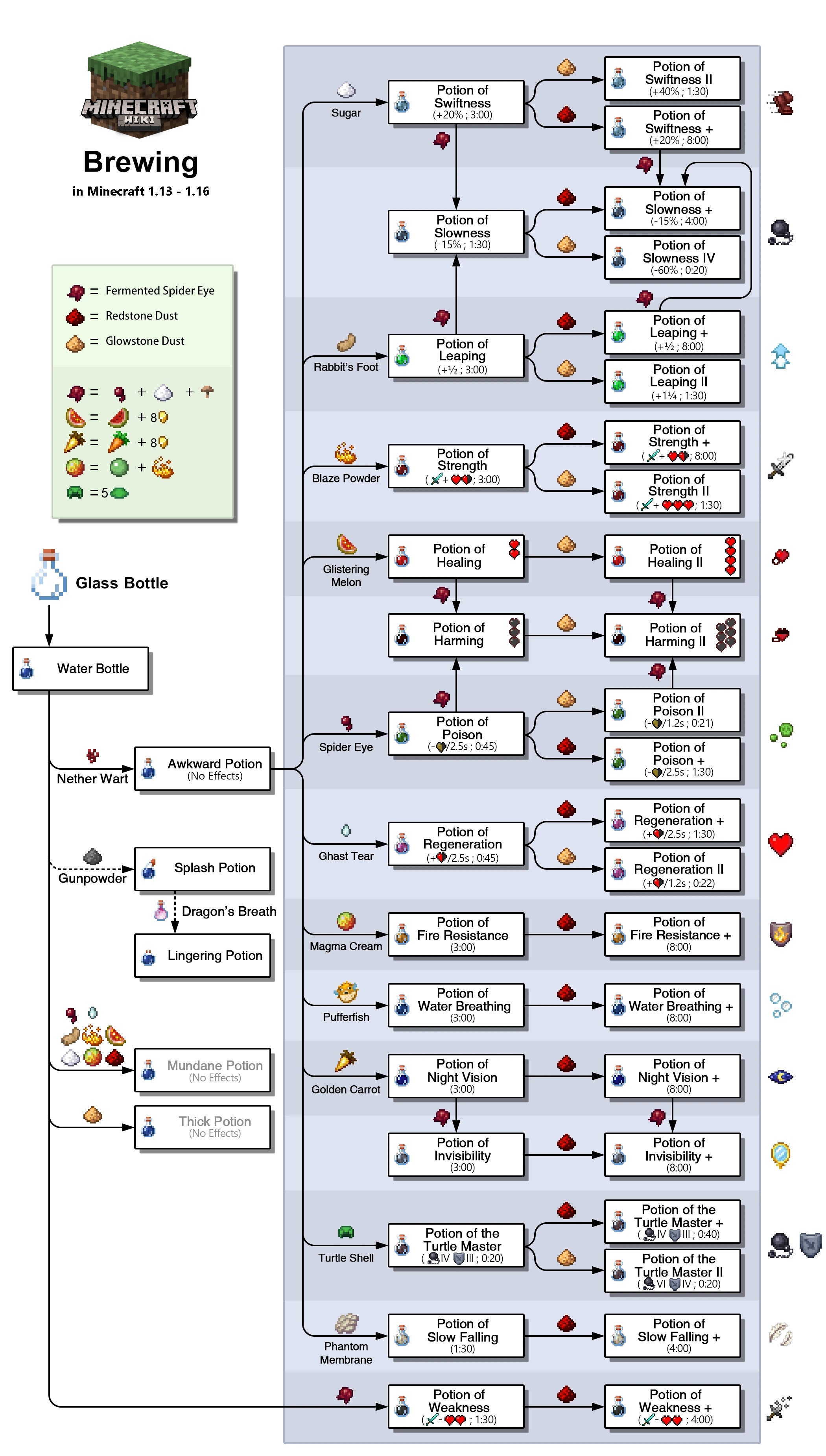
The chart doesn’t tell you how to create Splash or Lingering variations, but you can do that just by adding Gunpowder and Dragon’s Breath to each finished Potion.
All Minecraft Potion recipes
To brew a Potion in Minecraft, you need to add specific ingredients to a Water Bottle. You’ve already seen that ingredients like Gunpowder and Glowstone Dust can change how a Potion works, but the actual potion effect is created by adding one of the following ingredients:
- How to make Awkward Potion: Water Bottle + Nether Wart
- How to make Potion of Healing: Awkward Potion + Glistering Melon
- How to make Potion of Poison: Awkward Potion + Spider Eye
- How to make Potion of Harming: Potion of Healing/Poison + Fermented Spider Eye
- How to make Potion of Regeneration: Awkward Potion + Ghast Tear
- How to make Potion of Strength: Awkward Potion + Blaze Powder
- How to make Potion of Swiftness: Awkward Potion + Sugar
- How to make Potion of Leaping: Awkward Potion + Rabbit’s Foot
- How to make Potion of Slowness: Potion of Swiftness/Leaping + Fermented Spider Eye
- How to make Potion of Night Vision: Awkward Potion + Golden Carrot
- How to make Potion of Invisibility: Potion of Night Vision + Fermented Spider Eye
- How to make Potion of Fire Resistance: Awkward Potion + Magma Cream
- How to make Potion of Water Breathing: Awkward Potion + Pufferfish
- How to make Potion of the Turtle Master: Awkward Potion + Turtle Shell
- How to make Potion of Slow Falling: Awkward Potion + Phantom Membrane
- How to make Potion of Weakness: Water Bottle + Fermented Spider Eye
Not all of these Potions can be turned into Extended or more powerful versions of themselves, but all of them can be turned into Splash and Lingering versions. You can also mix-and-match the modifiers that are allowed, for example to create an Extended Lingering Potion of Poison, or a Splash Potion of Healing II.
How to make a Brewing Stand
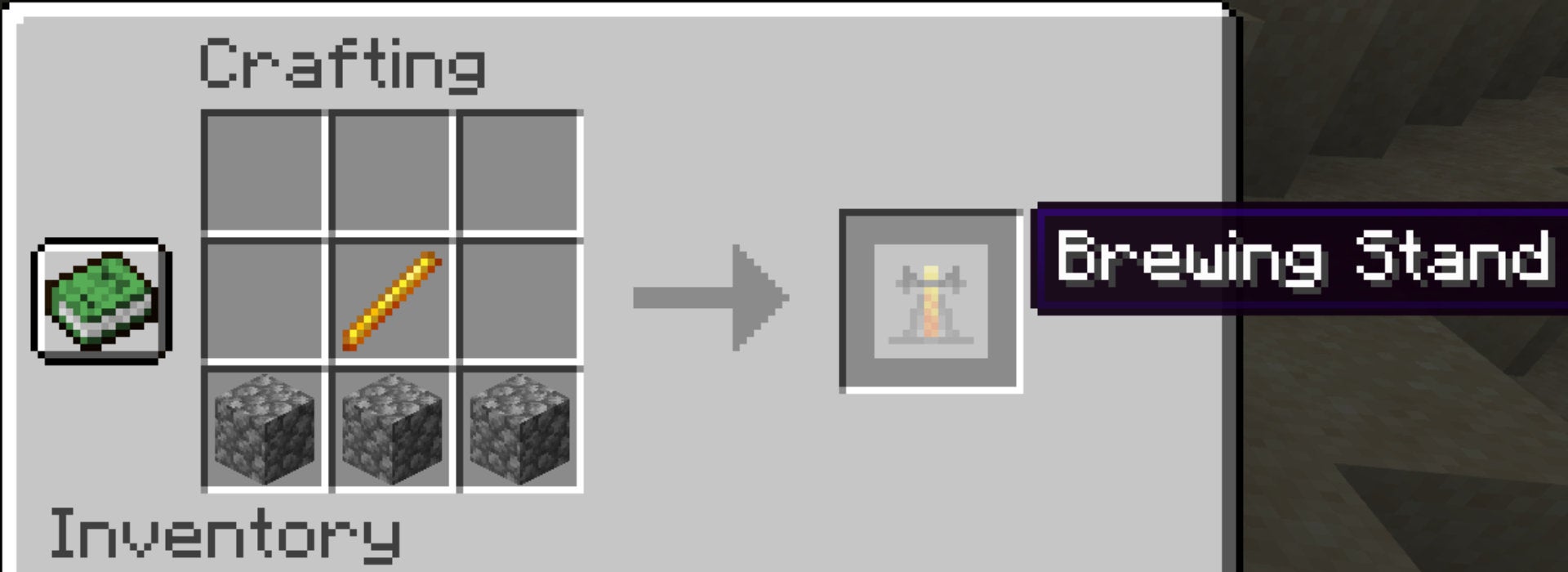
To make a Brewing Stand, you must combine 1 Blaze Rod and 3 Cobblestone in a Crafting Table. Place the 3 Cobblestone in a row, with the Blaze Rod just above it in the centre, like so:
Place the Brewing Stand on the ground and right-click it to open the brewing window. It looks complex at first but it’s actually very simple:
- The far-left slot is where you add Blaze Powder to fuel your brewing, just like putting Coal in a Furnace.
- The bottom three slots are where you place the bottles of potions that you want to modify.
- The top slot is where you place an ingredient that you’re using to alter the effects of the potions below.
Every time you add a new ingredient to a potion, it’ll take 20 seconds of brewing for the effect to occur. But with three potion slots at the bottom, you can brew multiple potions at once to save time.
Just remember that you’ll need Blaze Powder to keep the Brewing Stand fuelled and working!
That wraps up our guide to brewing potions in Minecraft Java Edition. Sticking to the topic of the Nether, why not take a look at our guide on Minecraft Netherite?


