Minecraft is a popular open-world sandbox game where you have to explore, survive and build.
The Minecraft building system is full of possibilities, being one of the key aspects of the success of the game. The Internet is full of massive building projects of all kinds, from buildings to entire worlds.
On PC, Minecraft is available in two versions: standard (or ‘Bedrock’) and Java Edition. Minecraft Java Edition is available on Windows, Mac, and Linux.
You can expand the possibilities of Minecraft: Java Edition through Forge, which is a server that improves the compatibility of the game with mods.
That said, many Minecraft: Java Edition players are facing a crashing issue where they receive an ‘Exit code -1’ error message when using Forge mods (1, 2, 3, 4, 5, 6, 7, 8).
Minecraft: Java Edition crashing or throwing ‘Exit code -1’ on Forge mods
According to multiple reports, the use of Forge mods is causing a crashing issue, an ‘Exit code -1’ message or a ‘Java Runtime Configuration may be invalid’ error message for many Minecraft: Java Edition players.
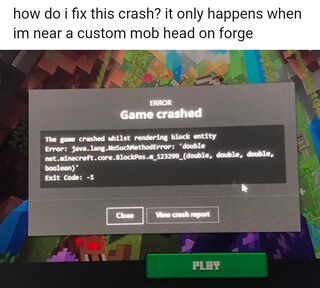
Hello, I am trying to play 1.18.2 modded but when I try and launch the game with any mods aside from those that are installed and launched with forge it will crash with an exit code 1 and says the Java Runtime Configuration may be invalid. I have re-installed Minecraft, Java and even downgraded the forge version but nothing works.
Source
Some face the issue without Forge mods too
In some cases, the same ‘Exit code -1’ or ‘Java Runtime Configuration may be invalid’ message may appear to players who don’t have any Forge mod installed on Minecraft: Java Edition (1, 2, 3, 4, 5, 6, 7, 8).
Exit code: 1
Every time I try to launch Minecraft I get a screen that says Invalid java runtime configuration” “exit code 1” I don’t have mods or forge downloaded it’s just straight vanilla. I did download Minecraft before i downloaded java if that matters at all. I also get a screen that says “java exception occurred” any help would be appreciated
Source
Also, some players suggest that all versions of the game (from 1.7.10 to 1.18.2) could be affected.
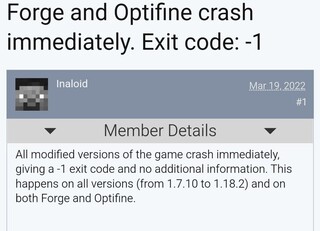
A potential explanation and fix
The issue could be related to the version for which the mod you install was developed. To avoid problems, you should install mods only on the version of the game for which they were developed.
General info: Always prepare for errors when your mods aren’t for THE EXACT version you play. For example, 1.18.1 mods might not work for 1.18.2 and vice versa.
Source
The Java version on your PC could also cause issues. It seems that you should only install the latest versions of Java for Minecraft versions higher than 1.16. For Minecraft versions before v1.16, you will need to use Java 8.
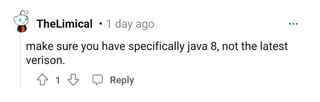
This might be the cause:
Latest Java = 17 -> for MC 1.16+
For older MC versions use Java 8
Source
There is no official acknowledgment of the issue from the developers yet. We will update this story if there is any change in the situation in the future.
PiunikaWeb started as purely an investigative tech journalism website with main focus on ‘breaking’ or ‘exclusive’ news. In no time, our stories got picked up by the likes of Forbes, Foxnews, Gizmodo, TechCrunch, Engadget, The Verge, Macrumors, and many others. Want to know more about us? Head here.


