Advertisement
Images via Psyonix
Written by
Jack Marsh
Posted
31st Mar 2022 16:56
Updated
1st Apr 2022 13:15
Rocket League crossplay took a while to be introduced, but playing cross-platform is the norm for fans now and the emergence of mouse and keyboard players is steadily growing. Having once been exclusive to PlayStation 3 in the Supersonic Acrobatic Rocket-Powered Battle-Cars era, Psyonix has moved the goalposts of their soccar game significantly, and now you’re able to play Rocket League crossplay and even level up with cross-platform progression. So, here’s everything you need to know about playing Rocket League crossplay and cross-platform.
Advertisement
How To Play Rocket League Crossplay
Playing Rocket League cross-play is now easier than ever before, allowing you to play alongside, or against, people on multiple platforms. Supported on Windows PC, macOS, PlayStation, Xbox, Linux, and Nintendo Switch, you can now play Rocket League with a huge variety of friends across multiple gaming consoles.
To enable Rocket League cross-play, all you will need to do is the following:
- Launch Rocket League
- Select Settings from the Main Menu
- Select the Gameplay tab
- Tick the “Cross-Platform Play” box
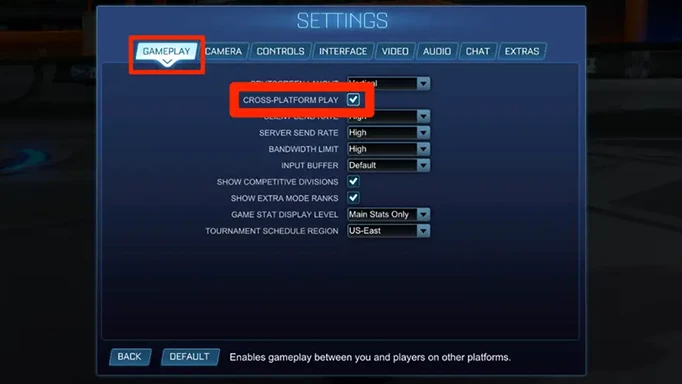
As with any feature in the game, if you simply want to play against people on your platform only, you can turn the option off. Whilst there are no real advantages of having it on or off for those playing on Xbox, PlayStation, and PC, the option may come in handy for Switch players.
How To Enable Rocket League Cross-Platform Progression
Since becoming free to play, Rocket League has also introduced cross-platform progression, meaning that you can now share one profile across multiple consoles. The Rocket League cross-platform progression system ties in you Competitive Rank, Rocket Pass progress, and your inventory items gathered over the years.
Enabling Rocket League cross-platform progression requires you to have an Epic Games account, which you can then link to your active Rocket League account through the linking site. Once your accounts have been linked, you will have to select a primary platform. Then, this specific account will serve as your main account, whilst you can still access everything from the other platforms linked to your account.
Advertisement
Unfortunately, there are some items that cannot be shared cross-platform. Platform-exclusive items such as the Sweet Tooth, Hogsticker, Armadillo, Mario and Luigi NSR, and Samus’ Gunship will not be able to be transferred to another linked platform, whilst on-disc DLCs like the Batman/DC Superheroes pack and Credits/Esports tokens also can’t be carried over to different platforms.
The trick here is that if you’ve got any of the non-transferrable items, then this should serve as your primary account, although it ultimately depends on which console you prefer to play on.
Advertisement
Rocket League cross-play and cross-platform comes as a great way of being able to play on the go, especially with the Nintendo Switch, and is a great addition if you’re ever thinking of switching allegiances in the console wars.
Advertisement
Advertisement
Trending
What Is The Rocket League FeteLix Flick And Why Are RLCS Pros Loving It?
Rocket League Golden Gifts 2021: Frosty Fest Rewards
Fortnite Llama-Rama Challenges: Fortnite X Rocket League Rewards
How To Get F1 Cars In Rocket League
How To Half Flip In Rocket League
Advertisement
Advertisement
Written by
Jack Marsh
Posted
30th Mar 2022 15:57
Updated
30th Mar 2022 17:30


