Andre “Typical Gamer” Rebelo is a highly ranked Fortnite player and a content creator from North America.
Unlike most Fortnite celebrities, Typical Gamer already had a solid follower base of one million subscribers on YouTube. Before moving onto Fortnite, Typical was mostly playing GTA V, but his channel witnessed an exponential growth when he turned out to be talented as he was entertaining in Fortnite.
Nowadays, he has more than 9.5 million subscribers and also streams on YouTube. In addition to creating content, Typical performs in weekly Cash Cups, FNCS, and was even close to qualifying for the 2019 Fortnite World Cup.
If you want to adopt his playstyle, then copying his settings can be an excellent first step. By using his settings, you’ll relate to his gameplay more and understand the in-game decisions he makes better.
Here’re Typical Gamer’s Fortnite settings.
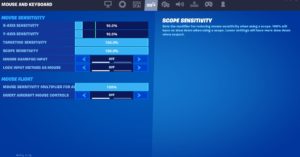
Typical Gamer’s mouse settings
While most mouse settings tend to be personal preference, you should set your mouse’s Polling Rate to 1000 Hz if it supports it. Doing so will ensure that you’ll be playing with the lowest possible response time, which can be essential in a game like Fortnite where milliseconds can matter.
| DPI | 400 | X-Axis Sensitivity | 10 percent |
| Y-Axis Sensitivity | 10 percent | Scope Sensitivity | 100 percent |
| Polling Rate | 1000 Hz | Targeting Sensitivity | 100 percent |
Typical Gamer’s key bindings
Typical Gamer keeps half of his building keybinds on his mouse while keeping the other on his keyboard. This allows him to have a less crowded layout and smoother transitions between building pieces.
| Wall | Q | Floor | Mouse Button 4 |
| Stairs | E | Roof | Mouse Button 5 |
| Trap | T | Use | Mouse Wheel Up |
| Crouch | Left Ctrl | Inventory | Tab |
| Map | M | Reload / Rotate | R |
| Building Edit | F | Confirm Edit on Release | Off |
| Harvesting Tool | 1 | Weapon Slot 1 | 2 |
| Weapon Slot 2 | 3 | Weapon Slot 3 | 4 |
| Weapon Slot 4 | 5 | Weapon Slot 5 | 6 |
Typical Gamer’s video settings
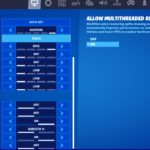
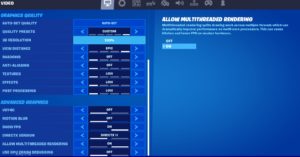
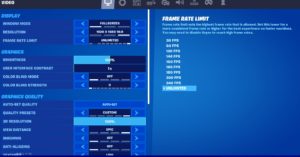
Typical Gamer prefers keeping most of his visual settings at the minimum values except for his View Distance setting. Keeping this setting at Epic allows him to spot loot and llamas better from a distance, making rotations easier in competitive games.
| Display Mode | Fullscreen | Resolution | 1920 x 1080 |
| Frame Rate Limit | Unlimited | Brightness | 100 percent |
| Interface Contrast | 1x | Color Blind Mode | Off |
| Color Blind Strength | Off | 3D Resolution | 100 percent |
| View Distance | Epic | Shadows | Off |
| Anti-Aliasing | Off | Textures | Low |
| Effects | Low | Post Processing | Low |
| V-Sync | Off | Allow Multi-threaded Rendering | On |
| Motion Blur | Off | Show FPS | On |
| HUD Scale | 95 percent |
Please use our Creator CODE: MOKOKIL1
Please follow and like us:


